
Who Decides What the Agent Can Access?

Last week I ran a session at an event on the same question this series started with: Who Owns the Architecture When AI Writes the Code?.
For most of the session I used a whiteboard instead of slides, and one business process as the example. A customer sends an order. An agent reads it, checks the prices, creates the order in the business system, and sends a confirmation.
When I asked the room where this gets difficult in their organizations, the answer was security.
After the discussion that followed, I do not think that answer is strange. But I think the question underneath it is more specific than “is the agent secure?”
In Every AI Agent Needs an Identity — and an Owner, I argued that every agent needs its own identity and a named owner. Identity tells us who is acting. The next question is what that identity is allowed to reach. Who decides that? Who enforces the decision? And how do we know, six months later, that the access still matches what was agreed?
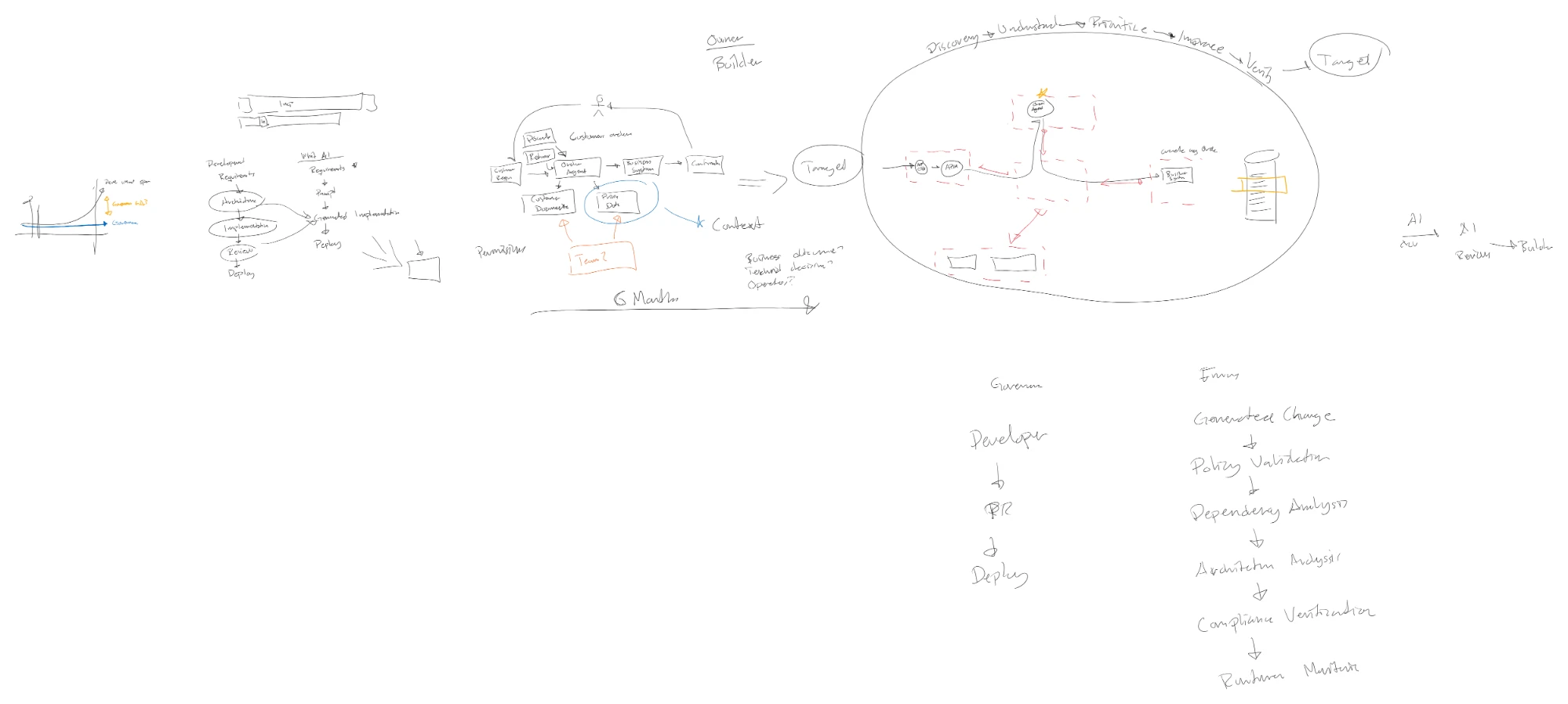
The board at the end of the session. Most of this article is on it.
The same questions, harder to answer
None of the questions above are new. A Logic App that reads customer documents and creates orders also needs a scoped identity, a limit on which documents it can read, a defined set of operations, an approval step for unusual cases, and logs that show what it did.
The difference with an agent is that it chooses. It decides at runtime which tool to call, in which order, and with which input, based on the request and on whatever it has read along the way. A classic integration does what we wired it to do. An agent combines what it is allowed to do.
That makes each of the familiar controls harder. Which documents it reads depends on how it interprets the order. Which operations it uses depends on the tools we made available. Whether it stays inside the intended scope depends on constraints in several places at once: the identity, the permissions on each resource, the data inside those resources, the tools and their backends, the instructions, the network path, the approval step, and the logs.
When people in the room said security was the biggest problem, I think this is what they meant. Not that one control is missing, but that it is hard to say which of these layers they have, who set them, and whether they still hold.
Six months later
The part of the whiteboard that generated the most discussion was a small addition I made halfway through.
The order agent has been in production for six months. It works. Returns have been added. Somebody asked whether it could handle discounts too, and of course it can, since most of what it needs is already there. Another team has built something similar against the same pricing data.
Then something stops working. Somebody needs more access to get it going again. The agent’s identity gets read access to the whole storage account instead of one container. Or it gets write access to the pricing data because a test needed it.
Nobody made a strange decision. They solved a problem.
But look at who decided what the agent can access: the person who was blocked, at the moment they were blocked, with the smallest change that made the error go away.
In the example, the customer documents and the pricing data belong to other teams. The team building the agent does not own them. So the builder is now deciding, on behalf of the data owner, how much of that data an agent sees. And in most of the environments I have seen, nobody comes back to that permission later. It becomes part of the architecture.
Who decides, and who implements
I think the confusion starts with treating this as one decision. It is several, and they belong to different people.
| Decision | Who owns it |
|---|---|
| Why the agent exists and which business process it serves | The business sponsor |
| Which data is in scope for that process, and how much of it | The owner of the data |
| The narrowest technical scope that still does the job | The team building the agent |
| The requirements every agent must meet, such as no shared keys | The platform or security team |
The team building the agent implements the agreed scope. The business sponsor and the data owners decide what is justified. The platform team sets the requirements that apply regardless of the process.
That does not mean every access change needs a new architecture meeting. It means access changes follow an agreed process, with review that matches the change. Narrowing a permission, or adding a tool that only reads data the agent already has access to, can be a normal pull request with the right reviewer. Giving the agent write access to data another team owns is not a configuration fix. It needs that team’s decision, and it needs to be recorded.
The problem in the six-months-later example is not that the permission was widened. It is that nobody who owns the data was asked, and nothing was written down that could be checked later.
Limiting the agent to the order it is working on
The most common question after the session was practical. How do we make sure the data the agent accesses is limited to the targeted scope?
For the order agent, the intended scope is the documents for this order, the current prices for these items, and the permission to create one order. Not every customer’s documents. Not the price history. Not the ability to change prices.
There are several places to enforce that, and they work best together.
Scope the role. Azure RBAC assigns a role at a scope. Storage Blob Data Reader on one container is a different thing from the same role on the subscription. A container-scoped role still gives access to everything in that container. Azure attribute-based access control can add conditions on top, for example based on blob index tags or paths, where the service supports it. In practice, separating data into containers by purpose is often the simpler option: if the order documents and the contracts share a container, ordinary container-scoped RBAC will not keep them apart.
Put the scope in the tool, and enforce it in the backend. A tool named get price for item is a narrower interface than run query. But the name does nothing on its own. The backend behind the tool has to check, on every call, that the caller is authorized, that the operation is one the tool allows, and that the customer or order in the request is one the agent may work on. An agent can call a tool many times, and it can pass an identifier it found in a document. Neither is wrong in itself. What the backend rejects is a call for a customer or order the caller is not authorized for, however the agent arrived at that identifier. The tool description cannot do that check.
Treat instructions as guidance, not authorization. The system prompt shapes what the agent tries to do. It does not decide what it is allowed to do. If the model asks for something outside the agreed scope, the backend must say no, regardless of how the request was phrased.
Keep the user’s authority with the backend. When the agent acts on behalf of a user, the system that owns the data should decide what that user may see. The next article covers this in more detail.
Make retrieval respect the same permissions. Documents indexed for retrieval can carry document-level permissions in the index. The risk is retrieval that does not enforce them: an index that holds everything, queried by a component that filters nothing. If the index is shared, the retrieval path needs to apply the same scope as the source.
Pass the data in where you can. For a well-defined process, the orchestration can hand the agent the documents for this order. The agent then needs no search permission at all. The authorization has not disappeared. It has moved to the orchestration, which now has to decide which documents it is allowed to supply.
Each of those is a decision with an owner from the table above. And each can drift.
Write down what was agreed
The other discussion that stayed with me was about where the constraints live.
On the board, we ended with an agreed target next to the environment. For the order agent, it looked something like this:
- Sensitive services use private access.
- Managed identity or Microsoft Entra Agent ID where the service supports it. No shared keys.
- Each production agent has its own identity, a sponsor, and an owner.
- Data access is scoped to the process, and the scope is written down.
- Write operations are named. Create order: yes. Change pricing: no.
- Discounts above an agreed limit require a human approval.
None of that is exotic. The point is that it is written down, so the current state can be compared with it.
When we then find that the agent’s identity has read access to the whole storage account, we have a gap, not an opinion. We can discuss whether there is a reason for it, accept an exception with an owner and an expiry, or change it. And we can see whether the gap is getting smaller.
Without the list, we can still find the broad permission. What we cannot do is say whether it is wrong. We cannot reliably verify an agreement nobody has defined.
Checking the boundary before and after deployment
The last thing we drew was the delivery pipeline, twice.
Today: developer, pull request, human review, deploy. That still applies. Generated code needs review like any other code.
What changes is that reading the diff is no longer enough to tell whether a change stays inside the agreed access. A generated infrastructure template can be well written and still assign a role at the wrong scope. So the review needs help from checks that know what was agreed:
- Before deployment. Azure Policy can deny configurations that are never acceptable, within the resource types and properties it supports. A check on role assignment scope, or on which identity a new tool uses, can run in the pipeline against the agreed list.
- After deployment. The permission that was widened six months later never went through a pull request. So the same questions need to be asked of the running environment, on a cadence that matches how often it changes.
The automated checks supplement the review. They do not replace the reviewer or the owners who agreed the scope. What they add is the ability to ask “is this still inside what we agreed?” every time, not only at deployment.
That is the same loop as in Governance Needs to Move at the Same Speed as AI: discover, understand, prioritize, improve, verify.
Where Helium fits
This is also how we approach it in Helium, our Continuous Cloud Governance Platform for Azure.
Helium does not decide what an agent should access. That stays with the owners in the table above. It does not see inside the agent’s prompt, and it does not know which documents a task needs.
What it does is check the supported Azure resources behind the process, such as the storage account and the API in front of the pricing data. The requirements are grouped in levels, so a team can agree which level is the target for an environment. The checks include whether key-based authentication is still allowed, whether managed identity is supported but not enabled, whether secrets sit in plain text, whether public access is enabled without a private alternative, and whether diagnostics and alerts exist. Scans repeat, so a resource that met the target last month and does not now shows up as a failing check in the next one.
With context, a static key on a publicly reachable resource behind the agent becomes a priority rather than one more finding. That gives the people who own the decisions something concrete to decide on, and shows whether the gap is closing after they do.
Which documents are in scope, and whether the write permission to the pricing data was justified, remain decisions for the business and the data owners.
Where to start
If I had to turn the session into a starting point, it would be this:
- Choose one agent. Preferably one that is already in production and touches data another team owns.
- Name the owners. A business sponsor, a data owner for each data source, a technical owner for the agent, and whoever sets the platform requirements.
- Define what it may access and do. Which data, at which scope. Which operations. Which actions need a human approval. Write it down next to the agent.
- Put the checks where the access happens. Scoped roles, separate containers where needed, tools whose backends check every call, retrieval that respects permissions, and an orchestration that decides what it supplies.
- Check it again as the solution changes. In the pipeline for the changes that go through it, and in the running environment for the ones that do not.
That gives one agent a clear answer to the question the room asked. The second agent is easier, because the owners and the process already exist.
This article has been about authorized access: what the agent may read and do. That is a different question from what the agent can reach over the network, and from what can leave through a connection we have approved. An agent with correctly scoped access can still send what it read to a destination it should not. That is where the next article, Identity Is Not the Only Perimeter, begins.
Want to see where your Azure environment falls short of what you have agreed?
DevUP Helium is our Continuous Cloud Governance Platform for Azure. Learn more about Helium or contact Mattias.